Selling at the counter
Cash shifts
Open the drawer with a counted float, see what should be in it, close it at the end of the day and print the Z report.
Who it is for:CashierManagerOwner
A cash shift is one cashier's time at one drawer. It starts with the cash counted in, and ends with the cash counted out. RetailDesk works out what should be there, so a short or extra amount shows up the same day.
Open a shift
The POS asks for it before your first sale. Count the drawer, type the Opening cash (৳) and click Open shift. Each cashier has their own shift.
During the shift
Cash sales, cash refunds and dues collected in cash all change what the drawer should hold. Card, bKash, Nagad and bank payments don't, but they are listed in the shift summary so you can match them with your phone or card machine.
Close the shift
At the end of the day, on the POS:
- Click Close shift.
- The summary shows sales by payment method, then:
- Opening cash
- + Cash sales (incl. exchange credit)
- + Due collected (cash)
- − Cash refunds (incl. exchanges)
- Expected in drawer
- Count the drawer and type it in Cash counted (৳). You see Matches, Over by … or Short by … straight away.
- Close the shift. Then click Print Z report and Done.
Shift list and reports
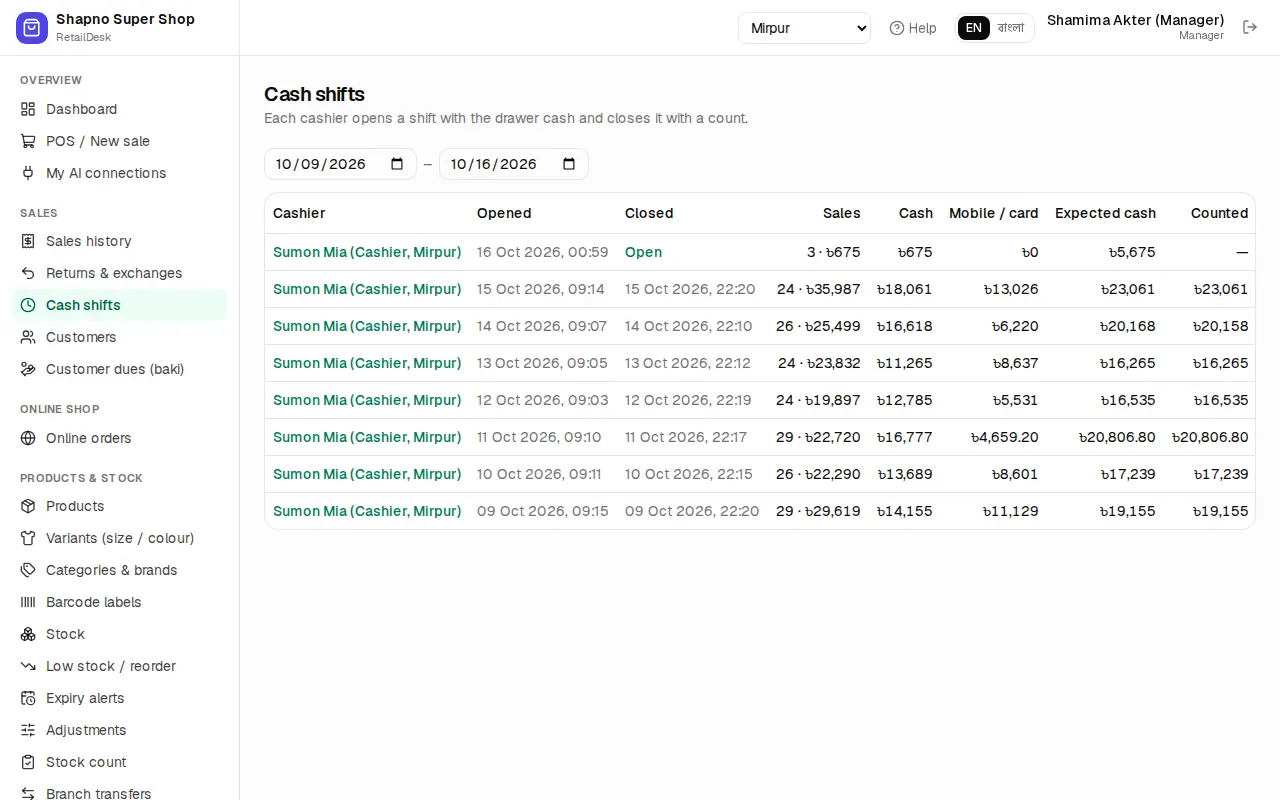
Sales › Cash shifts lists the shifts of the last 7 days with opening cash, expected cash, counted cash and the difference. Cashiers see only their own shifts; managers and the owner see everyone's.
Open a shift to print its report on 80 mm paper: an X report while the shift is still open (a mid-day check) or a Z report once it is closed, with lines for signatures.
For more than a few days, use the Cashier closing report in Reports.